Facts in this article reflect Microsoft documentation as of October 2026. Microsoft licensing changes often; confirm current terms with your licensing partner before you buy.
Many of our conversations with Microsoft 365 customers start with spend, not security. What are we paying Microsoft for, and how much of it are we actually using? The answer is often a surprise. Business Premium, E3, and E5 bundles include identity and security controls that many tenants have never switched on, and those controls are the building blocks of zero trust authentication. Our approach is to start there: put what you already own to work, maximize the return on your Microsoft spend, and then fill the gaps that remain.
Zero trust authentication means every request proves who is asking, from what device, and with what risk, every time it crosses a boundary. In a Microsoft environment, one identity provider can anchor that proof at every layer, from the chip in the laptop to the application on the server. That provider is Microsoft Entra ID.
When I was earning my computer science degree, we spent a lot of time on the seven layers of the OSI model and how each one works. That model has held up remarkably well. Map a security control to every layer, on the device and on the service, and you can build a true zero trust architecture, even when most of your workforce is remote. Layered verification gives far more assurance than a single SAML authentication at the application tier, because the assurance runs up and down the stack instead of resting on one sign-in.
What is usually missing is the map itself: where each layer checks identity, which control enforces the decision, and which license switches it on. The rest of this article lays it out.
Never trust, always verify, at every hop
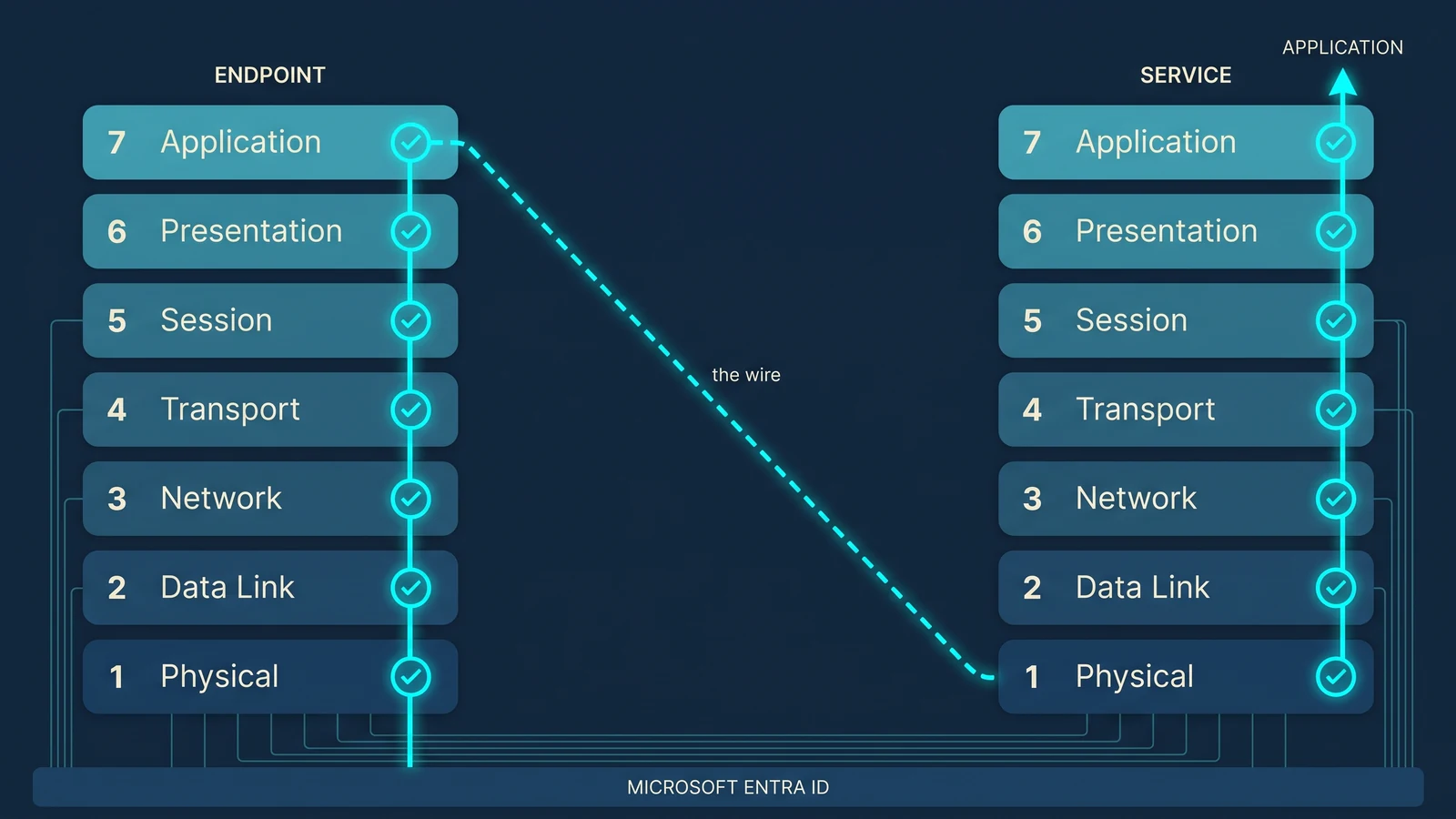
"Never trust, always verify" is easy to say and hard to demonstrate, so we will follow one request. It starts at the endpoint when the device powers on, climbs the client stack from Layer 1 to Layer 7, crosses the wire, and climbs the server stack from Layer 1 to Layer 7 until it reaches the application. At each hop, both ends verify something. Entra ID is either the verifier or the anchor that the verifier depends on.
The seven-layer OSI model gives us a precise question to ask at each level: who or what is being authenticated here, and what is being authorized? Traditional architectures answered that mostly at Layers 2 through 4. VLANs, subnets, firewall rules, and VPN concentrators decided who could reach what. Those controls answer where a packet came from. They cannot answer who is asking, from what device, with what risk, and whether that should still be allowed right now.
Zero trust identity and access management keeps the lower-layer controls but stops treating them as the trust decision. Identity becomes the policy anchor, and every layer becomes an enforcement point for that identity's decision. A Microsoft zero trust architecture works because every layer consumes an identity that Entra ID issued, registered, or vouches for.
This framing comes from the standards, not from a vendor. NIST SP 800-207, the federal reference for zero trust architecture, describes zero trust as moving defenses "from static, network-based perimeters to focus on users, assets, and resources" (NIST SP 800-207). CISA's Zero Trust Maturity Model lists Identity first among its five pillars (CISA ZTMM v2.0). The layer-by-layer map below is one way to make those pillars concrete in a Microsoft environment.
There is one honest caveat. Placing a product at a single OSI layer is a conceptual mapping, not strict protocol layering. Conditional Access, for example, influences behavior at several layers. The point of the map is to show where each control acts, so you can also find the layers where nothing is acting at all.
Authentication strength by layer
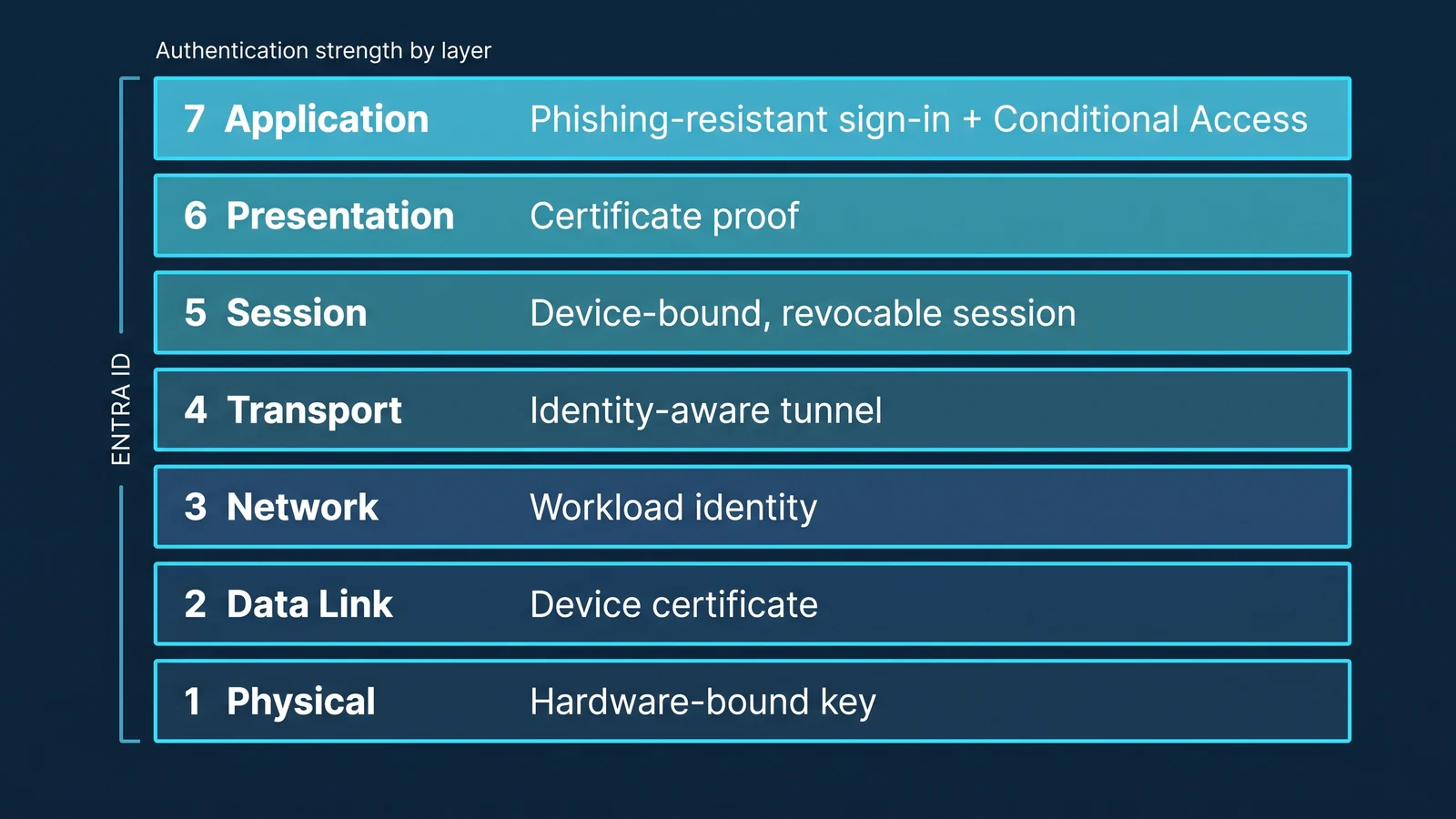
Zero trust authentication gets stronger with each layer, not only at the top. Each layer contributes a different kind and strength of assurance, and Entra ID anchors all of them. The table reads from the hardware upward, the way the request moves.
| Layer | Assurance it contributes | Credential it relies on | Entra ID's role |
|---|---|---|---|
| 1 Physical | Hardware-bound key: the user's key is held in the TPM or a security key | Windows Hello for Business or FIDO2 security key | Registers the user's key and verifies it at sign-in |
| 2 Data Link | Device certificate: the machine is a known, managed device | Intune-issued certificate, presented over 802.1X EAP-TLS | Device compliance gates issuance: the certificate goes only to Intune-enrolled, compliant devices |
| 3 Network | Workload identity: the code making the call is a known Entra object | Managed identity or service principal | Supplies the identity record that network controls check |
| 4 Transport | Identity-aware tunnel: a per-app connection opens only for an identified user and device | Entra token presented by the Global Secure Access client | Issues the token that opens the per-app connection |
| 5 Session | Revocable session: access can be stopped before the token expires | Tokens bound to one device, evaluated by CAE | Revokes sessions on critical events and binds tokens to the device |
| 6 Presentation | Certificate proof on the channel: the client shows possession of a certificate | X.509 certificates through certificate-based authentication; pre-authentication at Application Proxy | Validates the certificate and pre-authenticates before the app sees the request |
| 7 Application | Phishing-resistant user authentication plus Conditional Access on user, device, and risk | Passkeys (FIDO2) or certificate-based sign-in; OIDC / OAuth 2.0 tokens | Evaluates Conditional Access and issues the token the app checks |
Two caveats apply. At Layers 2 and 3, Entra ID is not the RADIUS server or the firewall. Its role is to anchor the identity those controls check: the device certificate is issued only to Intune-enrolled, compliant devices, and the workload identity is an Entra object. That anchoring is what makes the architecture identity-centric instead of network-centric. If an account is disabled or a device falls out of compliance in Entra ID, the change reaches every layer that depends on it.
Not every passkey is hardware-bound. Synced passkeys replicate across a user's devices through a cloud account, so they do not give the Layer 1 assurance in this table. If you want that assurance, require device-bound passkeys, FIDO2 security keys, or Windows Hello for Business through a Conditional Access authentication strength.
Phishing resistance also has a precise meaning. NIST defines it as "the ability of the authentication protocol to prevent the disclosure of authentication secrets and valid authenticator outputs to an impostor verifier without reliance on the vigilance of the claimant" (NIST glossary). In other words, it holds even when the user is fooled. Entra ID's built-in Phishing-resistant MFA authentication strength accepts only methods designed for that: Windows Hello for Business or platform credential, FIDO2 security keys, and multifactor certificate-based authentication (Microsoft Learn). A password followed by a push approval satisfies ordinary MFA, but not this strength.
How the strengths stack
Strength matters most in combination. Each layer checks independently, on the assumption that a neighbor may fail. Five situations show how:
- A phished password. If Conditional Access requires a phishing-resistant method at Layer 7, a password alone does not complete sign-in. The attacker would also need the Layer 1 key, which stays in hardware on the user's device.
- A stolen session token. Token protection at Layer 5 binds the token to the device that requested it, so for supported applications a replay from another machine is rejected.
- A compromised account. When an administrator disables the account or a critical event fires, CAE at Layer 5 revokes the session for CAE-capable clients and services without waiting for the token to expire.
- Unapproved code on a signed-in device. App Control for Business at Layer 7 on the endpoint blocks the code, even though the user authenticated correctly.
- A rogue device on the wire. A device that fails its Layer 2 certificate check does not receive network admission, so an attacker must defeat a second, separate check.
No single layer is perfect. The design goal is that when one layer fails, the others keep checking.
Both ends of the request
Every request has two ends: the device that makes it and the service that receives it. Zero trust has to hold at both, and the controls on each side are different.
Where policy is decided: the service side
| Layer | Microsoft capability | Authentication | Authorization / enforcement |
|---|---|---|---|
| 7 Application | Microsoft Entra ID, Enterprise Apps, Entitlement Management | OIDC / OAuth 2.0, passkeys (FIDO2) | Conditional Access, app roles, access reviews |
| 6 Presentation | Entra Application Proxy pre-auth; Azure App Gateway / Front Door WAF | mTLS, JWT validation, certificate-based authentication | WAF rules, header-based SSO |
| 5 Session | Continuous Access Evaluation (CAE), Cloud Kerberos Trust, token protection | Kerberos tickets, device-bound tokens | Near-real-time session revocation |
| 4 Transport | Global Secure Access (Entra Private Access / Internet Access) | User + device identity over TLS | Per-app access policies replace network-wide VPN |
| 3 Network | Azure VNets, Azure Firewall, NSGs | Managed identities, service principals | NSG, UDR, firewall rules |
| 2 Data Link | Intune certificates + 802.1X (RADIUS via NPS) | EAP-TLS with device certificates | Compliance-based VLAN assignment |
| 1 Physical | Windows Hello for Business, TPM 2.0, FIDO2 security keys | Hardware-bound keys, biometrics | Hardware-enforced sign-in |
Pre-authentication at Layer 6 comes from Entra Application Proxy. Front Door and App Gateway contribute WAF inspection on the service side, not pre-authentication.
Where policy is enforced: the endpoint
| Layer | Microsoft capability | What it does on the device |
|---|---|---|
| 7 Application | MSAL, Intune Endpoint Privilege Management, App Control for Business (formerly WDAC), AppLocker | Acquires tokens, elevates just in time, allows only approved code |
| 6 Presentation | Windows CNG with TPM-backed keys | Stores keys so they cannot be exported; asserts client certificates |
| 5 Session | CAE-capable clients, cached Kerberos tickets and Primary Refresh Token | Honors revocation challenges; holds session state |
| 4 Transport | Global Secure Access client, Defender Firewall | Tunnels traffic per app; controls host transport |
| 3 Network | Defender for Endpoint network protection, Intune firewall policies | Blocks malicious destinations; host-level microsegmentation |
| 2 Data Link | Intune Wi-Fi and VPN profiles | 802.1X supplicant with certificate-based network admission |
| 1 Physical | TPM 2.0, Secure Boot, Windows Hello sensors | Boots trusted code; anchors identity in hardware |
The cloud decides, and the endpoint enforces. A perfect Conditional Access policy is undermined by a device that runs unapproved code or leaks its keys, and a hardened device is undermined by a token that cannot be revoked.
Where Microsoft Entra Internet Access fits
Entra Private Access covers traffic to your own applications. Its counterpart, Microsoft Entra Internet Access, covers everything else: SaaS and general internet traffic. Microsoft describes it as "an identity-centric Secure Web Gateway" (Microsoft Learn), and it shows up on both sides of the stack.
- On the endpoint, Layer 4. The same Global Secure Access client that carries private-app traffic tunnels internet-bound traffic to Microsoft's Security Service Edge, so the request leaves the device already tied to an Entra ID user and device.
- At the edge, Layers 6 and 7. Web content filtering allows or blocks by web category or fully qualified domain name. For plain HTTP it reads the URL; for HTTPS it reads the Server Name Indication in the TLS handshake. Microsoft lists TLS inspection as an enhancement for higher-fidelity categorization.
- In policy, Layer 7. Filtering policies are grouped into security profiles, and security profiles can be linked to Conditional Access. The identity that signs a user into an application also decides which sites that user can reach.
Because enforcement happens at the cloud edge instead of an on-premises proxy, the same policy applies whether the user is in the office or working remotely. That closes a common gap in remote-work security: the laptop that is well protected inside the building and only loosely protected outside it.
Which licenses enforce zero trust authentication at each layer
The table below summarizes Microsoft's documentation as of October 2026. "E3" includes the Education (A3) and Government (G3) equivalents and "E5" includes A5 and G5, except where the notes say otherwise.
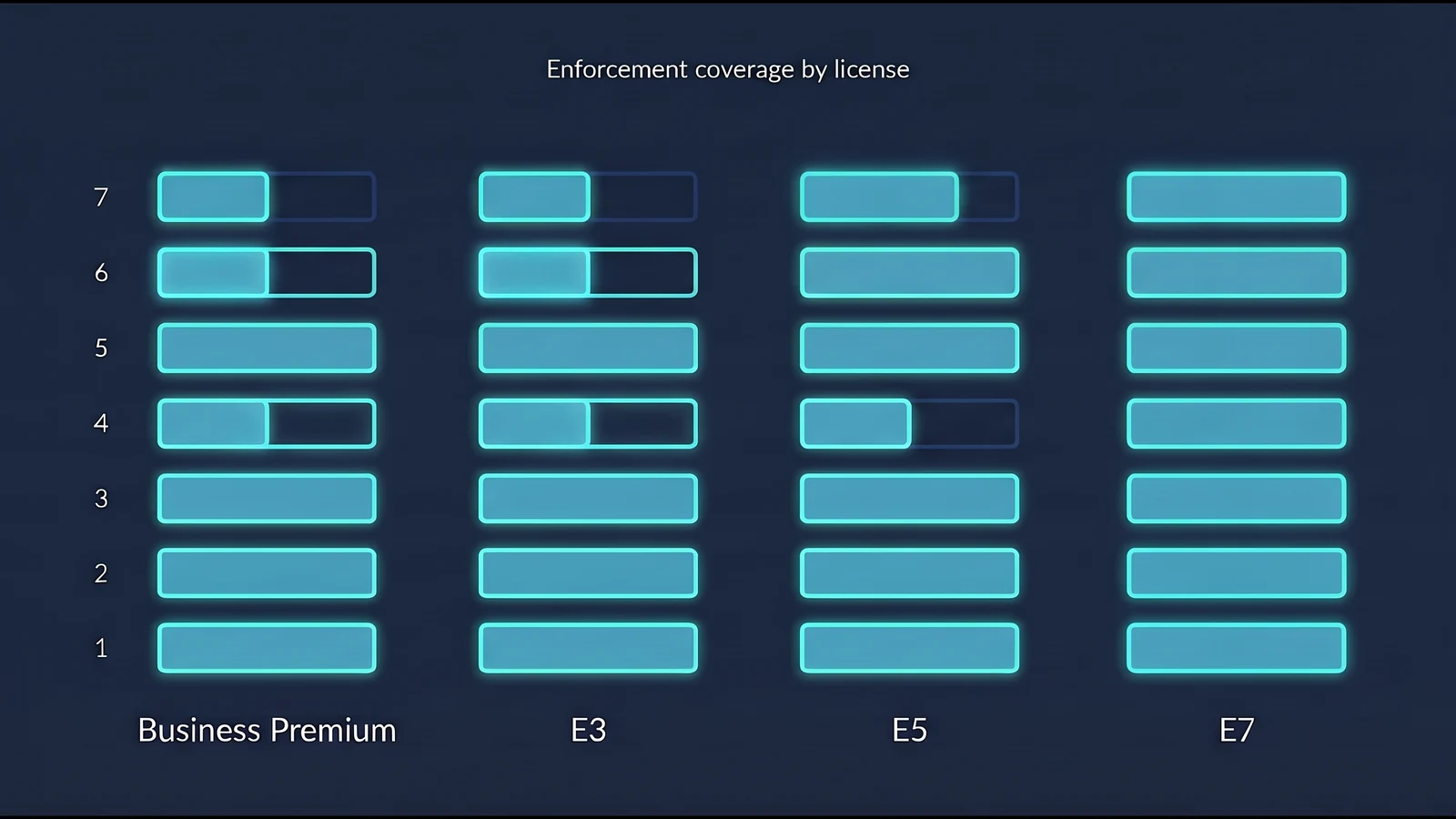
| Layer | Capability | Business Premium | E3 / A3 / G3 | E5 / A5 / G5 | E7 |
|---|---|---|---|---|---|
| 7 | Single sign-on, OIDC / OAuth, MSAL | ✓ | ✓ | ✓ | ✓ |
| 7 | Conditional Access | ✓ | ✓ | ✓ | ✓ |
| 7 | Risk-based Conditional Access (ID Protection) | Add-on | Add-on | ✓ | ✓ |
| 7 | Privileged Identity Management | Add-on | Add-on | ✓ | ✓ |
| 7 | Lifecycle Workflows and full Entra ID Governance | Add-on | Add-on | Add-on | ✓ |
| 7 | Passkeys (FIDO2) | ✓ | ✓ | ✓ | ✓ |
| 7 | App Control for Business / AppLocker | ✓ | ✓ | ✓ | ✓ |
| 7 | Intune Endpoint Privilege Management | Add-on | Add-on | ✓ ¹ | ✓ |
| 6 | Certificate-based authentication | ✓ | ✓ | ✓ | ✓ |
| 6 | Entra Application Proxy | ✓ | ✓ | ✓ | ✓ |
| 6 | Microsoft Cloud PKI | Add-on | Add-on | ✓ ¹ | ✓ |
| 5 | CAE for critical events ² | ✓ | ✓ | ✓ | ✓ |
| 5 | Token protection (Conditional Access session control) | ✓ | ✓ | ✓ | ✓ |
| 4 | Global Secure Access, Microsoft traffic profile ³ | ✓ | ✓ | ✓ | ✓ |
| 4 | Entra Private Access and Internet Access ³ | Add-on | Add-on | Add-on | ✓ |
| 3 | Defender network protection and web content filtering | ✓ ⁴ | ✓ | ✓ | ✓ |
| 2 | Intune Wi-Fi / VPN profiles with EAP-TLS certificates | ✓ | ✓ | ✓ | ✓ |
| 1 | Windows Hello for Business | ✓ | ✓ | ✓ | ✓ |
| 1 | Intune device compliance | ✓ | ✓ | ✓ | ✓ |
Notes
- Microsoft's July 2026 packaging update added Endpoint Privilege Management, Cloud PKI, and Enterprise App Management (and Security Copilot) to Microsoft 365 E5. E3 gained Intune Plan 2, Remote Help, Advanced Analytics, and Defender for Office 365 Plan 1, but not EPM or Cloud PKI. The same update raised list prices effective July 1, 2026 (E3 8%, E5 5%), with rollout complete by August 1, 2026 (Microsoft licensing news). In government clouds, G5 GCC receives EPM, Enterprise App Management, and Cloud PKI; G5 GCC High and DoD receive EPM but not Cloud PKI; G3 receives neither. We have not found Microsoft documentation for A3/A5; confirm with your licensing partner.
- In GCC High and DoD, CAE currently covers Exchange Online only (Microsoft Learn).
- Global Secure Access is available in GCC, but not in GCC High, DoD, or sovereign clouds (known limitations).
- Through Microsoft Defender for Business, which includes Defender for Endpoint Plan 1 capabilities for organizations up to 300 users (Microsoft Learn). Network protection and web content filtering are Defender for Endpoint Plan 1 capabilities (Microsoft Learn).
Infrastructure items such as Azure Firewall, NSGs, App Gateway, and Front Door are billed on Azure consumption, not per-user licensing. RADIUS for 802.1X is delivered through Windows Server NPS or a third-party cloud RADIUS service; Entra ID does not natively provide RADIUS. NPS validates certificates against Active Directory accounts, so cloud-only Entra-joined devices typically need a cloud RADIUS service. Either way, 802.1X needs a certificate source: Microsoft Cloud PKI, or an on-premises certificate authority through the Intune certificate connector.
Where E7 fits
Microsoft 365 E7, generally available since May 1, 2026, is E5 plus Microsoft 365 Copilot, the Microsoft Entra Suite, and Agent 365 (Microsoft Learn). For identity, what matters is the Entra Suite, which E3 and E5 customers can also buy on its own. It adds Entra Private Access, Entra Internet Access, and full Entra ID Governance, closing the Layer 4 and lifecycle gaps that E5 leaves open.
Trade press reports Education (A7) and Government (G7) versions available since October 1, 2026, with G7 limited to GCC at launch. We have not found Microsoft documentation confirming either, so treat them as "confirm before you plan."
What you probably already own and have not switched on
These are findings that come up often when we assess Microsoft tenants.
Phishing-resistant sign-in has no license barrier. Microsoft documents passkeys and certificate-based authentication as available in every Entra ID edition, including Free (passkeys, CBA). Requiring them through Conditional Access authentication strengths needs P1, which Business Premium and E3 include.
App Control for Business is not an Enterprise-only feature. Microsoft documents App Control policies as supported on all Windows client editions running Windows 10 version 2004 or later with KB5024351, or when deployed through an MDM such as Intune (feature availability). A Business Premium organization can enforce code allow-listing at Layer 7 of the endpoint today.
Token protection needs only Entra ID P1. Binding sign-in tokens to the device that requested them blocks replay of stolen tokens, a common post-phishing technique, for supported applications. Microsoft documents it as requiring P1 (deployment guide), so E3 and Business Premium qualify.
Every P1 tenant owns part of Global Secure Access. The Microsoft traffic profile, universal tenant restrictions (which block sign-ins to tenants you do not own), compliant network checks, and source IP restoration are included with Entra ID P1 (Microsoft Learn). Layer 4 identity enforcement for Microsoft 365 traffic is available before you buy anything new.
Revocation does not wait for token expiry. CAE critical event evaluation, such as account disablement or a password reset, does not depend on Conditional Access policies and is available in any tenant for CAE-capable clients and services, per Microsoft's documentation.
E5 got more in July 2026. Microsoft's July 2026 packaging update added Endpoint Privilege Management and Cloud PKI to E5, alongside a 5% list-price increase, with rollout complete by August 1, 2026. If you hold E5, removing standing local admin rights and issuing device certificates for 802.1X no longer require separate purchases.
E5 does not include automated lifecycle. Joiner, mover, and leaver automation through Lifecycle Workflows requires Entra ID Governance, the Entra Suite, or E7. This is a frequent gap we see in E5 tenants that believe they are "fully licensed."
The trade-offs you still have to decide
Licensing removes the barrier. It does not make the design decisions for you.
Lower-layer versus upper-layer enforcement. Network segmentation is fast and predictable but blind to identity. Identity-aware access decides per request but adds a dependency on the identity plane. Keep segmentation as a blast-radius backstop and move the access decision up to Layer 7.
Endpoint agent overhead. Defender, Intune, and the Global Secure Access client each hook the operating system at different layers. Roll them out in pilot rings, retire overlapping agents, and baseline device performance before broad deployment.
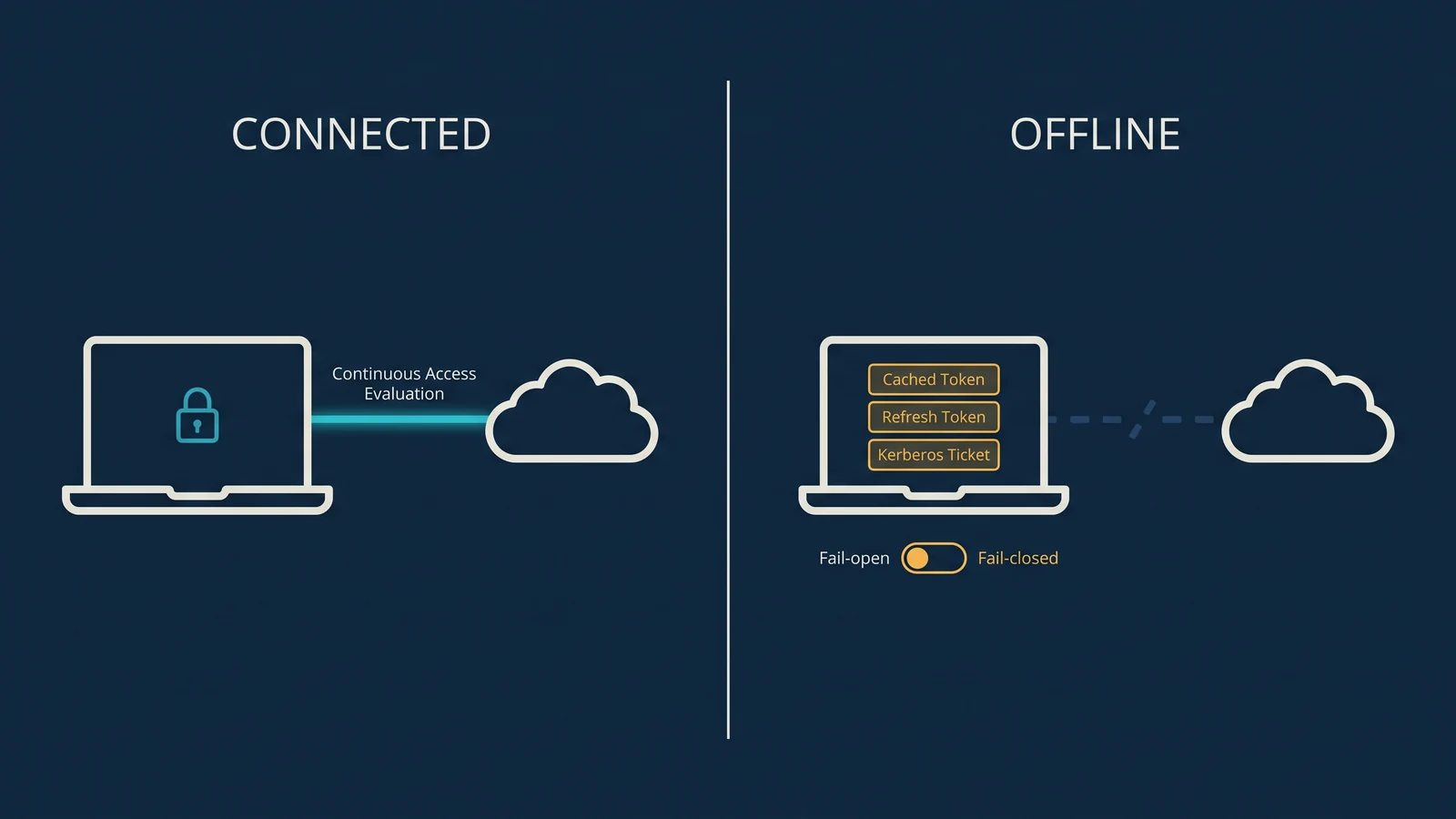
The offline gap. A disconnected laptop runs on cached tokens, its Primary Refresh Token, and Kerberos tickets that CAE cannot revoke until it reconnects. Decide fail-open or fail-closed per application tier, shorten token lifetimes for high-risk applications, and document the decision so it is defensible to an auditor.
Regulated government tenants move more slowly. If you operate in GCC High or DoD, plan around the current gaps in CAE coverage and Global Secure Access availability rather than the commercial roadmap.
A practical sequence
For most Microsoft 365 organizations, this is a defensible order for getting risk reduction from licenses already paid for.
- Layer 7 and Layer 1 first. Conditional Access baselines, passkeys or Windows Hello for Business, and device compliance as a required signal.
- Layer 5. Confirm CAE is active, then enable token protection for supported applications.
- Layer 7 on the endpoint. App Control for Business in audit mode, then enforce. On E5, enable Endpoint Privilege Management and remove standing local admin rights.
- Layers 3 and 2. Defender network protection in block mode, Intune firewall policies, and certificate-based 802.1X using Intune (with Cloud PKI on E5 or G5 GCC, or an on-premises certificate authority through the Intune certificate connector).
- Layer 4. Turn on the Global Secure Access Microsoft traffic profile and universal tenant restrictions, then evaluate Entra Private Access as the replacement for broad VPN access.
- Close the lifecycle gap. If joiner, mover, and leaver processes are still manual, that is the case for Entra ID Governance, the Entra Suite, or E7.
Frequently asked questions
What is zero trust authentication? Zero trust authentication verifies every request explicitly, using the identity of the user or workload, the health of the device, and real-time risk, instead of trusting a request because it comes from inside the network. In a Microsoft environment, Entra ID makes that decision and the controls at each layer enforce it.
Is zero trust better than a VPN? A VPN authenticates once and then grants access to a network segment. Zero trust authentication grants access to one application at a time and keeps evaluating the session. Entra Private Access applies that model to private apps, so many organizations replace broad VPN access with per-app policies and keep network segmentation as a backstop.
Do I need Microsoft 365 E5 or E7 to get zero trust authentication? No. Conditional Access, passkeys, certificate-based authentication, token protection, Windows Hello for Business, device compliance, and App Control for Business are all available with Business Premium or E3. E5 adds risk-based policies, privileged identity management, and, since July 2026, Endpoint Privilege Management and Cloud PKI. The Entra Suite or E7 adds per-app private access and lifecycle automation.
What are the pillars of zero trust, and how does this map to them? Frameworks count them differently. CISA's Zero Trust Maturity Model (version 2.0, April 2023) has five pillars: Identity, Devices, Networks, Applications and Workloads, and Data, plus three cross-cutting capabilities: Visibility and Analytics, Automation and Orchestration, and Governance. The Department of Defense Zero Trust Strategy uses seven: User, Device, Application and Workload, Data, Network and Environment, Automation and Orchestration, and Visibility and Analytics. The OSI view in this article cuts across all of them. It shows where the identity pillar is enforced inside each of the others.
The bottom line
Identity is the new perimeter, but identity alone does not stop lateral movement. It needs hardware-rooted keys beneath it and network-layer enforcement beside it, all anchored to one identity provider. For Microsoft 365 customers, that provider is Entra ID, and most of the controls that enforce its decisions are already licensed. The work is in mapping those layers, sequencing them, and keeping them configured as Microsoft keeps changing what each license includes.